Specification and Compatibility Table
Built only from the product data available to us. Where a figure was not provided, it is marked "Not stated" rather than guessed.
| Model | Resolution | Pan/Tilt or 360 | Night Vision | Two-Way Audio | Storage | Wi-Fi | Extra for placement | Price |
|---|---|---|---|---|---|---|---|---|
| PETCPU Pet Camera | Not stated | 360-degree | Yes | Yes | Not stated | 5G/2.4G | Treat dispenser, motion alert | $129.99 |
| Tapo C201 | 1080P | Pan/Tilt | Yes | Yes | Local (SD) or optional cloud | Not stated | Motion detection, siren | $17.96 |
| aosu 2K Indoor | 2K | 360-degree | IR night vision | One-touch call | Not stated | 2.4 GHz | Smart motion tracking, Alexa | $32.99 |
| Tapo C211 (2-Pack) | 2K | Pan/Tilt | Yes | Yes | Local storage or optional cloud | Not stated | Two units for two zones, siren | $44.99 |
| Tapo C200 | 1080P | Pan/Tilt | Yes | Yes | Cloud & SD card | Not stated | Works with Alexa & Google Home | $21.99 |
| Kasa EC70 | 1080p | Pan/Tilt | Yes | Yes | Local (subscription-free) or optional cloud | Not stated | Motion detection & tracking | $25.99 |
Last Updated: July 28, 2026

- Live Stream from Anywhere with Pan/Tilt: Sharp and clear 1080p Full HD provides high quality video right in the palm of your hand. Camera is operated with the Tapo or Kasa App
- Real-Time Motion/Sound Detection: Get alerts on your smart phone whenever motion or sound is detected even at night (30ft). Enable patrol mode on your home security camera system
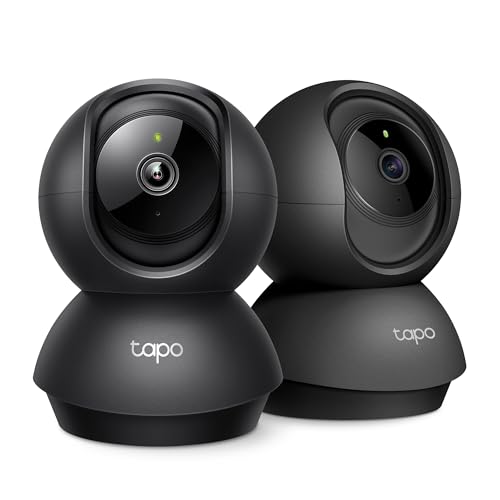
- 【2K High Definition】Capture every detail inside your home with crystal-clear 2K high definition video with this indoor security camera. Easily see what your baby is holding or
- 【Up, Down, All Around】This Pan/Tilt IP camera see everything across an entire room or walkway with the 360° horizontal and 114° vertical range pan/tilt field of view
The Short Answer
Mount each camera in a room corner, roughly chest-high (4 to 5 feet), angled slightly down so the lens sees the doorway, the pet's favorite resting spot, and the floor in between. One pan/tilt or 360-degree camera covers a single open room; a typical home needs one per zone your pet actually uses, prioritizing entry points and the room where anxiety behavior happens. Coverage comes from smart angles, not from buying more cameras than you have vantage points for.
Why Placement Beats Camera Count
The instinct is to put the camera on a shelf facing the middle of the room. That gives you a narrow cone of view and a lot of dead space behind and beside the lens. A corner position does the opposite: it opens the widest possible triangle of coverage from a single point, which is exactly why security installers default to corners.
Height matters just as much. Too low and furniture blocks the floor; too high and you get a top-down view where you can see that a dog exists but not what it is doing. Chest height with a slight downward tilt keeps the pet's body, face, and the floor all in frame.
Match the camera type to the room shape
A fixed-angle lens is fine for a hallway or a small room with one clear line of sight. An open-plan living space, or any room where your pet roams corner to corner, wants a pan/tilt or 360-degree unit so you can sweep to follow movement instead of hoping the animal stays in one cone.
Room-by-Room: Where the Camera Actually Goes
Living room or main hangout
This is usually the priority room because it is where pets spend the most awake time. Corner mount, facing the sofa or bed the pet uses, with the main doorway in the edge of the frame so you catch comings and goings. A pan/tilt camera earns its place here.
Entryways and doors
Separation-anxiety behavior spikes around the door you leave from. A camera that includes that door in frame tells you whether your pet settles after you go or paces and scratches. Place it so the door is visible but not so the lens stares straight into backlight from a window beside it.
Kitchen and food or litter zones
Counter-surfing, trash raiding, and litter-box monitoring all happen in specific spots. Aim the lens at the exact zone, not the whole room. A single well-placed camera on the counter-facing wall does more than a wide shot that includes empty floor.
Crate, kennel, or a nervous pet's safe spot
If your dog crates while you are out, the camera's only job is to see inside the crate clearly, including at night. Mount it close, angled at the crate opening, and confirm the infrared reaches that far in the dark.
Step-by-Step Placement Checklist
- Map your pet's real routine first. Watch where the animal actually sleeps, eats, and waits by the door. Cameras go where the behavior is, not where the outlet is convenient. Gotcha: people mount to the nearest socket and end up filming an empty corner.
- Pick the corner with the widest sightline. Stand in each corner and look across the room. Choose the one that sees the most floor and the key doorway. Gotcha: a corner behind the main sofa hides the exact spot you care about.
- Set height at 4 to 5 feet, tilt down slightly. High enough to clear furniture, low enough to read body language. Gotcha: ceiling mounts give a bird's-eye view that misses the pet's face and misfires motion alerts on shadows.
- Check the light behind your subject. Never point the lens at a window; the pet becomes a silhouette. Put windows behind the camera, not in front of it. Gotcha: morning or evening sun through a window blows out the whole frame for a couple of hours a day.
- Confirm Wi-Fi reach at that exact spot. Walk to the mount point with your phone and check signal before you commit. Many indoor cameras are 2.4 GHz only, which travels farther through walls than 5 GHz. Gotcha: a far bedroom corner may be a dead zone even if the router is one room over.
- Secure power and cable slack. Wired cameras need the cable run planned so the animal cannot chew or pull it. Gotcha: a dangling USB cable is a chew toy and a strangulation risk near a crate.
- Do a live walk-through. Open the app, walk the pet's route, and watch the feed on a second screen. Adjust pan limits and tilt until the whole route stays in view. Gotcha: what looks centered from the mount looks off-angle on the actual feed.
- Set motion zones and test an alert. Draw the detection area around the pet zone and the door, exclude a busy window, then trigger it once to confirm the notification lands. Gotcha: whole-frame motion detection buries you in alerts from curtains and passing car headlights.
What Goes Wrong, and How to Fix It
Blind spots the pet keeps disappearing into
Symptom: your dog walks out of frame and you have no idea where it went. Fix: for open rooms use pan/tilt or 360-degree coverage and set the home position toward the most-used zone. If the room has an L-shape or an alcove, one camera physically cannot see around the corner. Add a second unit or move the pet's bed into the visible zone.
Silhouettes and washed-out footage
Symptom: the pet is a black shape against a bright background, or the image is blown out at certain hours. Fix: this is almost always a window behind the subject. Re-aim so windows sit behind the camera, or move the camera to the opposite corner.
Night vision that stops a few feet in
Symptom: the crate or far side of the room vanishes into black at night. Fix: infrared range is limited, so move the camera closer to the zone you need to see after dark. Turn off room lights and check the real IR reach before you rely on it.
Alert overload or missed events
Symptom: constant false alerts, or none when it matters. Fix: tighten the motion zone to the pet's area and door, and exclude windows, fans, and TV screens. If your camera supports tracking, aim it at the pet's zone so it follows the animal instead of every shadow.
Feed drops and buffering
Symptom: the stream freezes or the camera keeps going offline. Fix: signal strength at the mount point. Move the router or add a mesh node, or relocate the camera to a spot with a stronger 2.4 GHz signal. A far corner that fails is worse than a slightly less ideal corner that stays connected.
The chewed cable
Symptom: camera dies, or worse, near a crate. Fix: route cable inside a wall channel or cord cover, mount high enough that the run is out of reach, and never leave slack dangling into a crate.
When the Fix Is a New One
Sometimes placement is not the problem; the camera cannot physically cover what you need. These are the honest signals it is time to change hardware rather than keep re-angling a fixed lens.
Your fixed camera cannot follow the pet
If you keep losing the animal at the edge of the frame in an open room, a pan/tilt body solves it where re-aiming a fixed lens never will. The Kasa EC70 adds pan/tilt with motion detection and tracking plus subscription-free local storage, so it can sweep to follow movement and you are not locked into a cloud fee. Check Price on Amazon
You need to cover two zones at once
One room plus the entryway, or the crate plus the food bowl, is two cameras' worth of work. The Tapo C211 (2-Pack) gives you two 2K pan/tilt units for two separate zones out of one box, with local storage and no subscription. Check Price on Amazon
You want to interact, not just watch
If the goal is to reassure or reward a pet while you are out, a viewing-only camera will never do it. The PETCPU Pet Camera adds remote treat tossing and two-way audio on a 360-degree body, which changes the job from monitoring to engaging. Check Price on Amazon
Frequently Asked Questions
How many pet cameras do I need for full coverage?
One per zone your pet actually uses, not one per room. Most homes need one in the main hangout room and one covering the entry or crate. A pan/tilt or 360-degree camera can cover a whole open room from a single corner, which cuts the count.
How high should I mount a pet camera?
Around 4 to 5 feet, chest height, tilted slightly down. That clears furniture while keeping the pet's face, body, and the floor in frame. Ceiling mounts give a top-down view that misses body language and triggers more false alerts.
Where should I put the camera in a room with big windows?
Put the windows behind the camera, never in front of it. Pointing the lens at a window turns your pet into a silhouette and blows out the image when the sun hits. Choose the corner that faces away from the brightest glass.
Will one camera cover an L-shaped or open-plan space?
Not fully. A single lens cannot see around a corner, so an L-shape or alcove will always have a blind spot. Use a 360-degree camera positioned for the most-used zone, or add a second unit for the hidden section.
Does Wi-Fi band affect where I can place the camera?
Yes. 2.4 GHz travels farther and through more walls than 5 GHz, so a far-room corner usually needs 2.4 GHz to stay connected. Some cameras support only 2.4 GHz; walk to the mount spot and check signal before you install.
Should I hide the camera or keep the cable exposed?
Keep the lens with a clear sightline, but route the cable out of the pet's reach with a cord cover or wall channel. A dangling cable near a crate is a chew and strangulation hazard, and a chewed cable kills the camera exactly when you need it.
For broader home-safety context on cords and recalled devices, you can check the U.S. Consumer Product Safety Commission recalls page.