Specification and Compatibility Table
| Model | Coverage | Resolution | Storage | Night Vision | Two-Way Audio | Wi-Fi | Assistant | Notable Extra | Price |
|---|---|---|---|---|---|---|---|---|---|
| PETCPU Treat Dispenser | 360-degree | Not stated | Not stated | Yes | Yes | 5G / 2.4G | Not stated | Remote treat tossing, motion alert | $129.99 |
| Tapo C201 | Pan/Tilt | 1080P | Local (SD) or optional cloud | Yes | Yes | Not stated | Not stated | Siren, motion detection | $17.96 |
| aosu 2K | 360-degree | 2K | Not stated | IR night vision | One-touch call | 2.4 GHz | Alexa | Smart motion tracking | $32.99 |
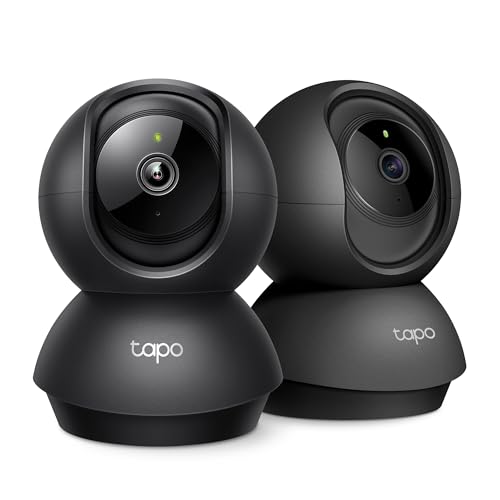
| Tapo C211 (2-Pack) | Pan/Tilt | 2K | Local (SD) or optional cloud | Yes | Yes | Not stated | Not stated | Siren, two cameras | $44.99 |
| Tapo C200 | Pan/Tilt | 1080P | Cloud & SD card | Yes | Yes | Not stated | Alexa & Google Home | Motion detection | $21.99 |
| Kasa EC70 | Pan/Tilt | 1080p | Local (SD) or optional cloud | Yes | Yes | Not stated | Not stated | Motion detection & tracking | $25.99 |
Last Updated: July 28, 2026

- Live Stream from Anywhere with Pan/Tilt: Sharp and clear 1080p Full HD provides high quality video right in the palm of your hand. Camera is operated with the Tapo or Kasa App
- Real-Time Motion/Sound Detection: Get alerts on your smart phone whenever motion or sound is detected even at night (30ft). Enable patrol mode on your home security camera system
- 【2K High Definition】Capture every detail inside your home with crystal-clear 2K high definition video with this indoor security camera. Easily see what your baby is holding or
- 【Up, Down, All Around】This Pan/Tilt IP camera see everything across an entire room or walkway with the 360° horizontal and 114° vertical range pan/tilt field of view
The Short Answer
Compare pet cameras on five things in this order: how the camera covers the room (pan/tilt versus 360-degree), resolution, where footage is stored (local SD card versus cloud), night vision, and two-way audio. Everything else is a bonus. Decide which of those five actually matter for your pet and your room before you look at price, because a $20 camera and a $130 camera can cover the same room equally well if the extras do not apply to you.
Why Feature-Matching Beats Chasing a Spec Sheet
Most buyers pick the camera with the biggest number next to "resolution" and regret it. A 2K sensor pointed at a wall your dog never visits is worse than a 1080p camera that pans to follow him. The task is not "find the strongest specs." It is "match the coverage pattern, storage model and alert style to how your pet actually uses the space."
That is why comparison should start with room coverage, not megapixels. A camera that rotates cannot see two rooms at once, and a stationary lens will miss a pet that roams. Get the coverage model right and the rest of the comparison gets much simpler.
The Five Features That Decide Everything
- Coverage: pan/tilt tilts and swivels on a base; 360-degree units spin a full circle. Both leave blind spots when the lens faces away.
- Resolution: 1080p is fine for a small room; 2K gives more detail when you zoom to check on a pet across a large space.
- Storage: local microSD is subscription-free; cloud is off-site but usually a paid plan.
- Night vision: IR lets you see a pet in a dark room, which is most of the day if you leave blinds closed.
- Two-way audio: lets you talk to and hear your pet; a subset add a one-touch call or a siren.
Step-by-Step: How to Compare Before You Buy
Work these in order. Each step narrows the field before you spend a cent.
Step 1: Map your room and pick a coverage type
Stand where you would mount the camera and look at where your pet spends time. If it is one room and one corner, a pan/tilt camera like the Tapo C200 or Kasa EC70 covers it. If your pet circles the whole room, a 360-degree unit such as the aosu 2K or PETCPU sweeps wider. Gotcha: neither type sees behind itself, so a camera pointed at the couch is blind to the front door in that moment.
Step 2: Confirm your Wi-Fi band
Check whether your router broadcasts 2.4 GHz, 5 GHz, or both. Several cameras here are 2.4 GHz only (the aosu 2K lists 2.4 GHz Wi-Fi), while the PETCPU lists both 5G and 2.4G. Gotcha: many mesh routers hide the 2.4 GHz band behind a single network name, and a 2.4 GHz-only camera will fail to pair until you separate the bands or enable a 2.4 GHz guest network.
Step 3: Decide wired versus placement freedom
Every camera in this guide is a wired indoor unit, so plan for a power outlet near the mount. Gotcha: "wired" here means power, not ethernet, and the cable length limits how high you can mount before you need an extension.
Step 4: Choose your storage model
If you never want a subscription, favor local storage. The Tapo C201, C211, Kasa EC70 and Tapo C200 all support local storage (SD card), with cloud optional. Gotcha: local recording needs a microSD card that is almost never included, so budget a few extra dollars and check the card-size ceiling in the app before you buy the wrong card.
Step 5: Match the extras to your pet, not the marketing
Only now weigh the add-ons. A treat dispenser (PETCPU) matters if you want to interact; smart motion tracking (aosu) matters if your pet moves fast; a siren (Tapo C201, C211) matters for deterrence, not for pets. Gotcha: paying for a treat-tossing camera you will use twice is the most common overspend in this category.
Step 6: Sanity-check the ecosystem
If you use voice assistants, confirm support. The aosu lists Alexa; the Tapo C200 lists Alexa and Google Home. Gotcha: assistant support does not guarantee a live feed on every smart display, so verify the specific device before you rely on it.
What Goes Wrong When Comparing (and How to Avoid It)
Buying resolution you cannot use
Symptom: you bought a 2K camera but the app streams soft, laggy video. Cause and fix: higher resolution needs more bandwidth; on a weak 2.4 GHz signal the stream drops to a lower quality. Compare resolution alongside your actual Wi-Fi strength, not in isolation.
Assuming a card is in the box
Symptom: the camera works live but records nothing to review later. Cause and fix: local-storage cameras ship without a microSD card. Confirm the model supports local storage (the Tapo and Kasa units here do), then buy a compatible card at the same time.
Pairing failure on setup night
Symptom: the app spins forever on "connecting." Cause and fix: the phone is on 5 GHz while a 2.4 GHz-only camera needs the 2.4 GHz band during pairing. Split your bands temporarily or move next to the router to finish setup.
Confusing 360-degree with all-at-once
Symptom: you miss the moment your pet knocks something over. Cause and fix: a 360-degree or pan/tilt camera only sees where it is currently aimed. Use motion alerts and, where available, motion tracking (Kasa EC70, aosu) to swing the lens toward movement automatically.
Overpaying for interaction features
Symptom: the treat dispenser jams or goes unused and you paid a premium. Cause and fix: only the PETCPU here dispenses treats, and it costs several times more than a plain monitor. If watching is the goal, a monitor-only camera does the same core job for far less.
Where a cell reads "Not stated," the spec was not in the product data. Confirm it on the product page before you rely on it. For recall history on any electronics you bring into the home, you can search the CPSC recalls database.
When the Fix Is a New One
Sometimes the honest answer is that your current camera cannot do the job and no setting will change that. Replace it, rather than keep fighting it, when you hit one of these signals.
Your storage plan turned into a recurring bill
If you are paying monthly just to review footage, a subscription-free local-storage camera changes the math. The Kasa EC70 records to a microSD card with cloud only optional, and adds motion detection and tracking so the lens follows movement. It swaps an ongoing cloud fee for a one-time card purchase.
One room is no longer enough
If your pet has claimed two rooms, one camera cannot cover both. The Tapo C211 (2-Pack) gives you two 2K pan/tilt units with local storage, so you can watch two spaces without a second purchase and without a subscription. It changes a single-room setup into a two-room one in a single box.
Watching is not enough and you want to interact
If your goal shifted from monitoring to engaging a bored or anxious pet, a plain monitor will never toss a treat. The PETCPU 360-degree Pet Camera adds remote treat dispensing, two-way audio and full 360-degree coverage, turning a passive feed into an interactive check-in. That is a different task than pure security, and it justifies the higher price only if you will actually use it.
Frequently Asked Questions
Is 2K worth it over 1080p for a pet camera?
Only if you have a large room and a solid Wi-Fi signal. 2K models like the aosu and Tapo C211 give more detail when you zoom in, but on a weak connection the stream drops in quality anyway. In a small room, 1080p from the Tapo C200 or Kasa EC70 is usually enough.
What is the difference between pan/tilt and 360-degree?
Pan/tilt cameras (Tapo C200, C201, C211, Kasa EC70) swivel and tilt on a base to cover a wide arc. 360-degree cameras (PETCPU, aosu) spin a full circle. Both only see where the lens is aimed at any moment, so neither watches the whole room at once.
Do I need a cloud subscription?
No, if you choose a local-storage model. The Tapo C201, C211, C200 and Kasa EC70 all support recording to an SD card with cloud as an optional add-on. You will need to buy the microSD card separately.
Will these cameras work on 5 GHz Wi-Fi?
It varies. The PETCPU lists both 5G and 2.4G, while the aosu lists 2.4 GHz only. The remaining models do not state a band in the data, so confirm it on the product page and be ready to use the 2.4 GHz band during pairing.
Can I talk to my pet through the camera?
Yes on the two-way audio models. The Tapo C200, C201, C211, Kasa EC70 and PETCPU all list two-way audio, and the aosu lists a one-touch call feature. Test the speaker volume in the app, since a timid pet may react to a loud voice.
Which features should I ignore to save money?
Skip a treat dispenser if you only want to watch, skip 2K if your room is small, and skip cloud if you are happy managing an SD card. Cutting features you will not use is how a $20 camera ends up doing the same job as a $130 one for your situation.